A Google Business Profile is one of the most powerful assets for local visibility. For many businesses, it generates more calls, visits, and enquiries than their website itself.
Yet most profiles are only partially optimised. Missing details, poor category selection, weak photos, and unmanaged reviews quietly limit rankings and conversions.
This Google Business Profile optimisation checklist brings together proven best practices used by local SEO professionals to help businesses improve visibility, engagement, and trust in Google Search and Maps.
Why Google Business Profile Optimisation Matters
Google Business Profile directly influences:
-
Local pack rankings
-
Google Maps visibility
-
Clicks, calls, and direction requests
-
Trust and conversion decisions
Google’s own data shows that businesses with photos receive 42 percent more requests for directions and 35 percent more website clicks than those without.
Optimisation is not about one tactic. It is about completeness, consistency, and ongoing management.
Google Business Profile Optimisation Checklist
1. Claim and Verify Your Google Business Profile
Before any optimisation work can begin, your Google Business Profile must be properly claimed and verified. Without verification, your listing will have limited visibility and you will not have full control over edits, reviews, or insights. According to Google, only verified businesses are eligible to appear consistently across Google Search, Google Maps, and voice-based results.
Verification also signals legitimacy. Google treats verified profiles as trustworthy sources of information, which directly affects whether your business is shown in competitive local results. Many businesses struggle with local visibility simply because verification was delayed, incomplete, or interrupted.
You should first confirm that your business qualifies for a Google Business Profile. This means you either interact with customers at a physical location or serve customers at their location within defined business hours. Online-only businesses without in-person interaction do not qualify.
Once eligibility is confirmed, search Google for existing listings using your current business name, previous names, phone numbers, and old addresses. If a listing already exists, you should claim it. If it is already claimed by someone else, submit an ownership request through Google Business Profile Manager.
Verification methods vary depending on your business type and account history. The most common method is postcard verification, which typically arrives within 5 to 14 days. Some businesses may qualify for phone, email, Search Console, or video verification. During postcard verification, it is critical not to change core details such as business name, address, or category, as this can reset the process.
Once verified, your profile gains full visibility and management access, allowing you to optimise and track performance properly.

2. Set Correct Ownership and User Access
User access management is often overlooked, yet it is one of the most important long-term safeguards for your Google Business Profile. Incorrect ownership settings can lead to disputes, loss of access, or permanent profile lockouts.
The business owner should always remain the Primary Owner of the listing. This ensures full control over the profile regardless of changes in staff or marketing partners. Agencies, consultants, and external vendors should only be added as Managers, not Owners.
It is also important to regularly review who has access to your profile. Former employees, outdated agencies, or inactive users should be removed promptly. Leaving unnecessary users connected increases security risk and creates confusion when updates are required.
For businesses with multiple locations, location groups should be used to organise listings and manage permissions at scale. This allows consistent access control across all branches and reduces administrative errors.
Correct user access protects your listing, simplifies collaboration, and ensures your business retains ownership over its digital presence.
3. Optimise Core Business Information (NAP)
NAP refers to Name, Address, and Phone number, and it remains a foundational element of local search optimisation. While Google has become more sophisticated at understanding businesses, consistency across platforms still plays a critical role in trust and accuracy.
Your business name should match exactly what is used in real-world branding, signage, and legal documentation. Adding keywords, service descriptions, or city names into the business name violates Google guidelines and can result in suspension.
Addresses should only be displayed if customers physically visit your location. For service-area businesses, the address should be hidden and service areas should be clearly defined instead. Phone numbers should be local and consistent with your website, directories, and citations.
Consistency across the web reinforces trust signals. When Google sees the same NAP information repeated accurately across trusted sources, it is more confident in ranking your business for local searches.
4. Choose the Right Primary and Secondary Categories
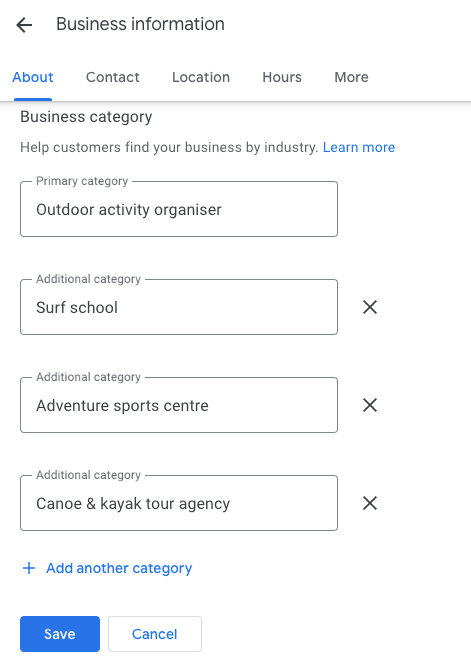
Categories are one of the strongest ranking signals in Google Business Profile optimisation. Your primary category tells Google what your business does and determines which search queries you are eligible to appear for.
Selecting the wrong primary category can severely limit visibility, even if all other optimisation efforts are strong. You should choose the category that best represents your core service, not a broad or loosely related option.
Secondary categories should only be added if they accurately reflect services you actively provide. Reviewing the categories used by top-ranking competitors in Google Maps can provide valuable insight into what Google expects for your industry.
Avoid category stuffing or selecting irrelevant categories, as this can confuse Google and weaken relevance signals.
5. Add Business Hours and Special Hours
Accurate business hours are essential for both rankings and user trust. Google prioritises showing businesses that are open or clearly indicate when they will be open next.
Standard operating hours should reflect when customers can realistically contact or visit your business. Special hours should be added in advance for holidays, public closures, or seasonal changes.
Incomplete or outdated hours often lead to lower engagement and missed opportunities. Studies consistently show that listings with complete and accurate hours receive higher click-through rates and more calls.
Keeping hours updated also prevents negative user experiences, such as customers arriving when a business is closed.
6. Write a Clear and Trustworthy Business Description
The business description is not a direct ranking factor, but it strongly influences conversion. It helps users quickly understand what your business does and whether it meets their needs.
Google allows up to 750 characters, but only the first portion is immediately visible. The opening section should clearly explain your services, target customers, and unique value.
The description should be written in natural language and focused on clarity rather than keyword density. Promotional language, pricing, URLs, and excessive keywords should be avoided.
A well-written description builds credibility, supports decision-making, and increases the likelihood that users will take action.
7. Add Website, Appointment, and Tracking URLs
Your Google Business Profile should guide users toward meaningful next steps. Website and appointment links connect visibility to real conversions.
URLs should always use HTTPS and lead to the most relevant page for the user. Single-location businesses often link to the homepage or a core service page, while multi-location businesses should link to location-specific landing pages.
Adding UTM tracking parameters allows you to measure traffic, leads, and conversions coming specifically from your profile. This data is essential for evaluating performance and ROI.
Accurate linking ensures that high-intent local traffic is directed to the right content at the right time.
8. Upload High-Quality Photos Regularly
Photos are both an engagement signal and a ranking factor. Google reports that businesses with photos receive significantly more direction requests and website clicks compared to those without.
A complete photo set should include a logo, cover image, exterior and interior photos, team photos, and images of products or services. All photos should be authentic, high resolution, and professionally presented.
Images must follow Google guidelines, including minimum resolution requirements and restrictions against stock photos or promotional text overlays.
Regular photo uploads signal activity and relevance, helping your profile stay competitive over time.
9. Add Services, Products, or Menus
Service, product, and menu sections expand your listing and provide additional context for Google and users. These sections increasingly influence visibility, especially for service-based and retail businesses.
Services should be clearly named, logically grouped, and described in detail. Retail businesses should highlight key products, while restaurants should maintain updated menus.
This information helps Google match your business with specific search intent and improves click-through rates by answering user questions upfront.
10. Manage and Respond to Reviews Consistently
Reviews are one of the strongest local ranking and conversion factors. Research shows that the majority of users read reviews before contacting a business, and both volume and recency matter.
You should encourage reviews consistently and respond to all feedback, including negative reviews. Responses demonstrate professionalism, customer care, and active management.
Monitoring reviews also helps identify fake or policy-violating content that should be reported. Businesses with active review management tend to achieve higher trust and stronger local performance.
11. Use Google Posts and Q&A Features
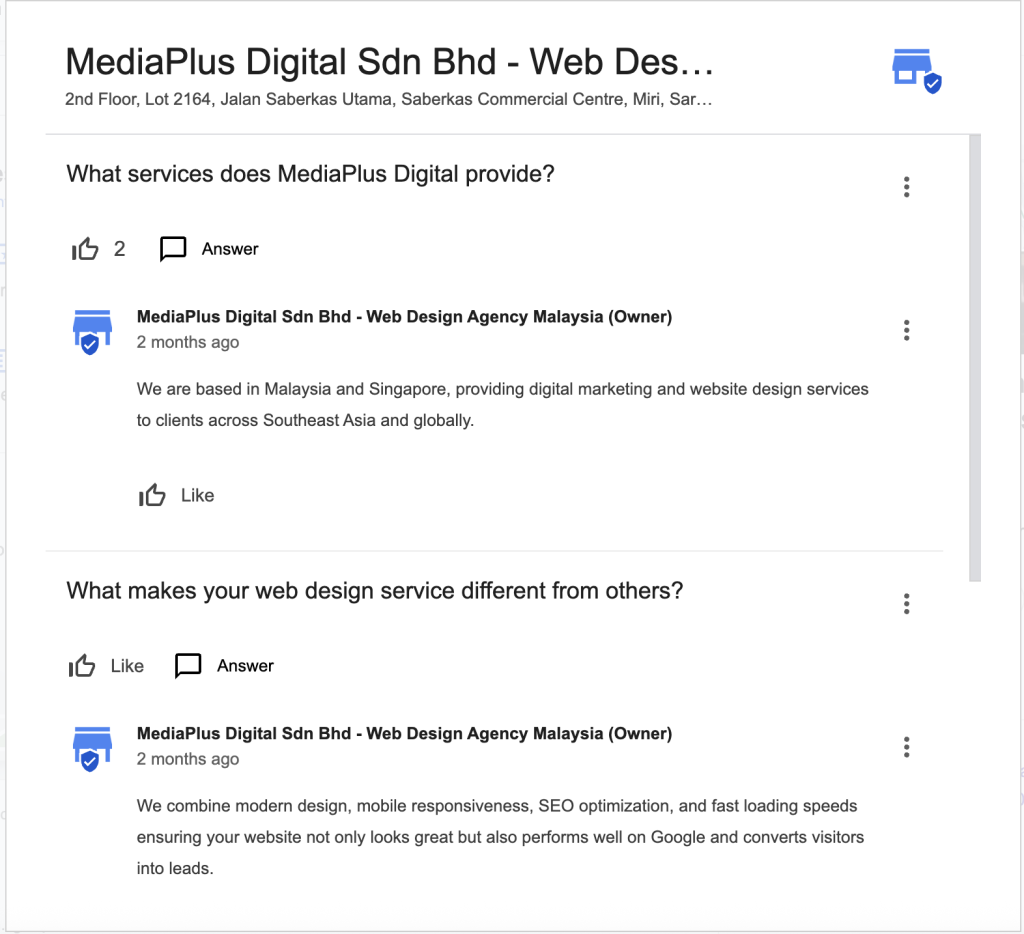
Google Posts and Q&A improve engagement and allow you to control key messaging within your profile. Posts can be used to share updates, announcements, or service highlights.
The Q&A section should be proactively populated with common customer questions and accurate answers. This prevents misinformation and improves user confidence.
Active use of these features increases interaction signals, which can support stronger visibility over time.
12. Monitor Insights and Maintain Ongoing Optimisation
Google Business Profile optimisation is an ongoing process, not a one-time task. Regular monitoring ensures your profile stays accurate, competitive, and aligned with user behaviour.
You should track visibility in Search and Maps, branded versus discovery searches, calls, website clicks, and direction requests. These insights help identify trends and areas for improvement.
Profiles that remain active and consistently updated tend to maintain more stable rankings and generate more reliable leads in the long term.
Where Professional Support Makes a Difference
Many businesses complete the basics but struggle with competitive markets, multi-location management, or sustained growth.
This is where working with experienced local specialists becomes valuable.
MediaPlus Malaysia approaches Google Business Profile optimisation as part of a structured local SEO service, not an isolated task. Profiles are optimised alongside website structure, content relevance, and conversion tracking to ensure visibility turns into measurable business results.
Their approach focuses on ranking stability, review velocity, and real customer actions rather than surface-level completion alone.
Final Thoughts
A fully optimised Google Business Profile is one of the highest ROI assets for local businesses.
This Google Business Profile optimisation checklist provides a clear framework to improve rankings, visibility, and conversions. When applied consistently and supported by strong local SEO fundamentals, it becomes a reliable source of leads and customer growth.
Optimisation is not about shortcuts. It is about accuracy, relevance, and ongoing refinement.